Enhance Security Operations with the Qualys Slack Shortcut Bot!
Workflow JSON
{"meta": {"instanceId": "03e9d14e9196363fe7191ce21dc0bb17387a6e755dcc9acc4f5904752919dca8"}, "nodes": [{"id": "adfda9cb-1d77-4c54-b3ea-e7bf438a48af", "name": "Parse Webhook", "type": "n8n-nodes-base.set", "position": [760, 640], "parameters": {"options": {}, "assignments": {"assignments": [{"id": "e63f9299-a19d-4ba1-93b0-59f458769fb2", "name": "response", "type": "object", "value": "={{ $json.body.payload }}"}]}}, "typeVersion": 3.3}, {"id": "b3e0e490-18e0-44b5-a960-0fdbf8422515", "name": "Qualys Create Report", "type": "n8n-nodes-base.executeWorkflow", "position": [1720, 1740], "parameters": {"options": {}, "workflowId": "icSLX102kSS9zNdK"}, "typeVersion": 1}, {"id": "80ae074b-bda5-4638-b46f-246a1b9530ae", "name": "Required Report Variables", "type": "n8n-nodes-base.set", "position": [1520, 1740], "parameters": {"options": {}, "assignments": {"assignments": [{"id": "47cd1502-3039-4661-a6b1-e20a74056550", "name": "report_title", "type": "string", "value": "={{ $json.response.view.state.values.report_title.report_title_input.value }}"}, {"id": "6a8a0cbf-bf3e-4702-956e-a35966d8b9c5", "name": "base_url", "type": "string", "value": "https://qualysapi.qg3.apps.qualys.com"}, {"id": "9a15f4db-f006-4ad8-a2c0-4002dd3e2655", "name": "output_format", "type": "string", "value": "={{ $json.response.view.state.values.output_format.output_format_select.selected_option.value }}"}, {"id": "13978e05-7e7f-42e9-8645-d28803db8cc9", "name": "template_name", "type": "string", "value": "={{ $json.response.view.state.values.report_template.report_template_select.selected_option.text.text }}"}]}}, "typeVersion": 3.3}, {"id": "b596da86-02c7-4d8e-a267-88933f47ae0c", "name": "Qualys Start Vulnerability Scan", "type": "n8n-nodes-base.executeWorkflow", "position": [1720, 1540], "parameters": {"options": {}, "workflowId": "pYPh5FlGZgb36xZO"}, "typeVersion": 1}, {"id": "61e39516-6558-46ce-a300-b4cbade7a6f6", "name": "Scan Report Task Modal", "type": "n8n-nodes-base.httpRequest", "position": [1620, 720], "parameters": {"url": "https://slack.com/api/views.open", "method": "POST", "options": {}, "jsonBody": "= {\n \"trigger_id\": \"{{ $('Parse Webhook').item.json['response']['trigger_id'] }}\",\n \"external_id\": \"Scan Report Generator\",\n \"view\": {\n\t\"title\": {\n\t\t\"type\": \"plain_text\",\n\t\t\"text\": \"Scan Report Generator\",\n\t\t\"emoji\": true\n\t},\n\t\"submit\": {\n\t\t\"type\": \"plain_text\",\n\t\t\"text\": \"Generate Report\",\n\t\t\"emoji\": true\n\t},\n\t\"type\": \"modal\",\n\t\"close\": {\n\t\t\"type\": \"plain_text\",\n\t\t\"text\": \"Cancel\",\n\t\t\"emoji\": true\n\t},\n\t\"blocks\": [\n\t\t{\n\t\t\t\"type\": \"image\",\n\t\t\t\"image_url\": \"https://upload.wikimedia.org/wikipedia/commons/thumb/2/26/Logo-Qualys.svg/300px-Logo-Qualys.svg.png\",\n\t\t\t\"alt_text\": \"Qualys Logo\"\n\t\t},\n\t\t{\n\t\t\t\"type\": \"section\",\n\t\t\t\"text\": {\n\t\t\t\t\"type\": \"mrkdwn\",\n\t\t\t\t\"text\": \"Select a template and generate a detailed scan report based on the results of your previous scans.\"\n\t\t\t}\n\t\t},\n\t\t{\n\t\t\t\"type\": \"input\",\n\t\t\t\"block_id\": \"report_template\",\n\t\t\t\"element\": {\n\t\t\t\t\"type\": \"external_select\",\n\t\t\t\t\"placeholder\": {\n\t\t\t\t\t\"type\": \"plain_text\",\n\t\t\t\t\t\"text\": \"Select a report template\",\n\t\t\t\t\t\"emoji\": true\n\t\t\t\t},\n\t\t\t\t\"action_id\": \"report_template_select\"\n\t\t\t},\n\t\t\t\"label\": {\n\t\t\t\t\"type\": \"plain_text\",\n\t\t\t\t\"text\": \"Report Template\",\n\t\t\t\t\"emoji\": true\n\t\t\t},\n\t\t\t\"hint\": {\n\t\t\t\t\"type\": \"plain_text\",\n\t\t\t\t\"text\": \"Choose a report template from your Qualys account to structure the output.\"\n\t\t\t}\n\t\t},\n\t\t{\n\t\t\t\"type\": \"input\",\n\t\t\t\"block_id\": \"report_title\",\n\t\t\t\"element\": {\n\t\t\t\t\"type\": \"plain_text_input\",\n\t\t\t\t\"action_id\": \"report_title_input\",\n\t\t\t\t\"placeholder\": {\n\t\t\t\t\t\"type\": \"plain_text\",\n\t\t\t\t\t\"text\": \"Enter a custom title for the report\"\n\t\t\t\t}\n\t\t\t},\n\t\t\t\"label\": {\n\t\t\t\t\"type\": \"plain_text\",\n\t\t\t\t\"text\": \"Report Title\",\n\t\t\t\t\"emoji\": true\n\t\t\t},\n\t\t\t\"hint\": {\n\t\t\t\t\"type\": \"plain_text\",\n\t\t\t\t\"text\": \"Provide a descriptive title for your report. This title will be used in the report header.\"\n\t\t\t}\n\t\t},\n\t\t{\n\t\t\t\"type\": \"input\",\n\t\t\t\"block_id\": \"output_format\",\n\t\t\t\"element\": {\n\t\t\t\t\"type\": \"static_select\",\n\t\t\t\t\"placeholder\": {\n\t\t\t\t\t\"type\": \"plain_text\",\n\t\t\t\t\t\"text\": \"Select output format\",\n\t\t\t\t\t\"emoji\": true\n\t\t\t\t},\n\t\t\t\t\"options\": [\n\t\t\t\t\t{\n\t\t\t\t\t\t\"text\": {\n\t\t\t\t\t\t\t\"type\": \"plain_text\",\n\t\t\t\t\t\t\t\"text\": \"PDF\",\n\t\t\t\t\t\t\t\"emoji\": true\n\t\t\t\t\t\t},\n\t\t\t\t\t\t\"value\": \"pdf\"\n\t\t\t\t\t},\n\t\t\t\t\t{\n\t\t\t\t\t\t\"text\": {\n\t\t\t\t\t\t\t\"type\": \"plain_text\",\n\t\t\t\t\t\t\t\"text\": \"HTML\",\n\t\t\t\t\t\t\t\"emoji\": true\n\t\t\t\t\t\t},\n\t\t\t\t\t\t\"value\": \"html\"\n\t\t\t\t\t},\n\t\t\t\t\t{\n\t\t\t\t\t\t\"text\": {\n\t\t\t\t\t\t\t\"type\": \"plain_text\",\n\t\t\t\t\t\t\t\"text\": \"CSV\",\n\t\t\t\t\t\t\t\"emoji\": true\n\t\t\t\t\t\t},\n\t\t\t\t\t\t\"value\": \"csv\"\n\t\t\t\t\t}\n\t\t\t\t],\n\t\t\t\t\"action_id\": \"output_format_select\"\n\t\t\t},\n\t\t\t\"label\": {\n\t\t\t\t\"type\": \"plain_text\",\n\t\t\t\t\"text\": \"Output Format\",\n\t\t\t\t\"emoji\": true\n\t\t\t},\n\t\t\t\"hint\": {\n\t\t\t\t\"type\": \"plain_text\",\n\t\t\t\t\"text\": \"Choose the format in which you want the report to be generated.\"\n\t\t\t}\n\t\t}\n\t]\n}\n}", "sendBody": true, "jsonQuery": "{\n \"Content-type\": \"application/json\"\n}", "sendQuery": true, "specifyBody": "json", "specifyQuery": "json", "authentication": "predefinedCredentialType", "nodeCredentialType": "slackApi"}, "credentials": {"slackApi": {"id": "", "name": "[Your slackApi]"}}, "typeVersion": 4.2}, {"id": "29cf716c-9cd6-4bd9-a0f9-c75baca86cc1", "name": "Vuln Scan Modal", "type": "n8n-nodes-base.httpRequest", "position": [1620, 560], "parameters": {"url": "https://slack.com/api/views.open", "method": "POST", "options": {}, "jsonBody": "= {\n \"trigger_id\": \"{{ $('Parse Webhook').item.json['response']['trigger_id'] }}\",\n \"external_id\": \"Scan Report Generator\",\n \"view\": {\n\t\"title\": {\n\t\t\"type\": \"plain_text\",\n\t\t\"text\": \"Vulnerability Scan\",\n\t\t\"emoji\": true\n\t},\n\t\"submit\": {\n\t\t\"type\": \"plain_text\",\n\t\t\"text\": \"Execute Scan\",\n\t\t\"emoji\": true\n\t},\n\t\"type\": \"modal\",\n\t\"close\": {\n\t\t\"type\": \"plain_text\",\n\t\t\"text\": \"Cancel\",\n\t\t\"emoji\": true\n\t},\n\t\"blocks\": [\n\t\t{\n\t\t\t\"type\": \"image\",\n\t\t\t\"image_url\": \"https://upload.wikimedia.org/wikipedia/commons/thumb/2/26/Logo-Qualys.svg/300px-Logo-Qualys.svg.png\",\n\t\t\t\"alt_text\": \"Qualys Logo\"\n\t\t},\n\t\t{\n\t\t\t\"type\": \"section\",\n\t\t\t\"text\": {\n\t\t\t\t\"type\": \"plain_text\",\n\t\t\t\t\"text\": \"Initiate a network-wide scan to detect and assess security vulnerabilities.\",\n\t\t\t\t\"emoji\": true\n\t\t\t}\n\t\t},\n\t\t{\n\t\t\t\"type\": \"input\",\n\t\t\t\"block_id\": \"option_title\",\n\t\t\t\"element\": {\n\t\t\t\t\"type\": \"plain_text_input\",\n\t\t\t\t\"action_id\": \"text_input-action\",\n\t\t\t\t\"initial_value\": \"Initial Options\"\n\t\t\t},\n\t\t\t\"label\": {\n\t\t\t\t\"type\": \"plain_text\",\n\t\t\t\t\"text\": \"Option Title\",\n\t\t\t\t\"emoji\": true\n\t\t\t},\n\t\t\t\"hint\": {\n\t\t\t\t\"type\": \"plain_text\",\n\t\t\t\t\"text\": \"Specify the title of the option profile to use for the scan.\"\n\t\t\t}\n\t\t},\n\t\t{\n\t\t\t\"type\": \"input\",\n\t\t\t\"block_id\": \"scan_title\",\n\t\t\t\"element\": {\n\t\t\t\t\"type\": \"plain_text_input\",\n\t\t\t\t\"action_id\": \"text_input-action\",\n\t\t\t\t\"placeholder\": {\n\t\t\t\t\t\"type\": \"plain_text\",\n\t\t\t\t\t\"text\": \"Enter your scan title\"\n\t\t\t\t},\n\t\t\t\t\"initial_value\": \"n8n Scan 1\"\n\t\t\t},\n\t\t\t\"label\": {\n\t\t\t\t\"type\": \"plain_text\",\n\t\t\t\t\"text\": \"Scan Title\",\n\t\t\t\t\"emoji\": true\n\t\t\t},\n\t\t\t\"hint\": {\n\t\t\t\t\"type\": \"plain_text\",\n\t\t\t\t\"text\": \"Provide a descriptive title for the scan. Up to 2000 characters.\"\n\t\t\t}\n\t\t},\n\t\t{\n\t\t\t\"type\": \"input\",\n\t\t\t\"block_id\": \"asset_groups\",\n\t\t\t\"element\": {\n\t\t\t\t\"type\": \"plain_text_input\",\n\t\t\t\t\"action_id\": \"text_input-action\",\n\t\t\t\t\"placeholder\": {\n\t\t\t\t\t\"type\": \"plain_text\",\n\t\t\t\t\t\"text\": \"Enter asset groups\"\n\t\t\t\t},\n\t\t\t\t\"initial_value\": \"Group1\"\n\t\t\t},\n\t\t\t\"label\": {\n\t\t\t\t\"type\": \"plain_text\",\n\t\t\t\t\"text\": \"Asset Groups\",\n\t\t\t\t\"emoji\": true\n\t\t\t},\n\t\t\t\"hint\": {\n\t\t\t\t\"type\": \"plain_text\",\n\t\t\t\t\"text\": \"Specify asset group titles for targeting. Multiple titles must be comma-separated.\"\n\t\t\t}\n\t\t}\n\t]\n}\n}", "sendBody": true, "jsonQuery": "{\n \"Content-type\": \"application/json\"\n}", "sendQuery": true, "specifyBody": "json", "specifyQuery": "json", "authentication": "predefinedCredentialType", "nodeCredentialType": "slackApi"}, "credentials": {"slackApi": {"id": "", "name": "[Your slackApi]"}}, "typeVersion": 4.2}, {"id": "a771704d-4191-4e80-b62f-81b41b047a87", "name": "Route Message", "type": "n8n-nodes-base.switch", "position": [940, 640], "parameters": {"rules": {"values": [{"outputKey": "Vuln Scan Modal", "conditions": {"options": {"leftValue": "", "caseSensitive": true, "typeValidation": "strict"}, "combinator": "and", "conditions": [{"operator": {"type": "string", "operation": "equals"}, "leftValue": "={{ $json.response.callback_id }}", "rightValue": "trigger-qualys-vmscan"}]}, "renameOutput": true}, {"outputKey": "Scan Report Modal", "conditions": {"options": {"leftValue": "", "caseSensitive": true, "typeValidation": "strict"}, "combinator": "and", "conditions": [{"id": "02868fd8-2577-4c6d-af5e-a1963cb2f786", "operator": {"name": "filter.operator.equals", "type": "string", "operation": "equals"}, "leftValue": "={{ $json.response.callback_id }}", "rightValue": "qualys-scan-report"}]}, "renameOutput": true}, {"outputKey": "Process Submission", "conditions": {"options": {"leftValue": "", "caseSensitive": true, "typeValidation": "strict"}, "combinator": "and", "conditions": [{"id": "c320c8b8-947b-433a-be82-d2aa96594808", "operator": {"name": "filter.operator.equals", "type": "string", "operation": "equals"}, "leftValue": "={{ $json.response.type }}", "rightValue": "view_submission"}]}, "renameOutput": true}]}, "options": {"fallbackOutput": "none"}}, "typeVersion": 3}, {"id": "c8346d57-762a-4bbd-8d2b-f13097cb063d", "name": "Required Scan Variables", "type": "n8n-nodes-base.set", "position": [1520, 1540], "parameters": {"options": {}, "assignments": {"assignments": [{"id": "096ff32e-356e-4a85-aad2-01001d69dd46", "name": "platformurl", "type": "string", "value": "https://qualysapi.qg3.apps.qualys.com"}, {"id": "070178a6-73b0-458b-8657-20ab4ff0485c", "name": "option_title", "type": "string", "value": "={{ $json.response.view.state.values.option_title['text_input-action'].value }}"}, {"id": "3605424b-5bfc-44f0-b6e4-e0d6b1130b8e", "name": "scan_title", "type": "string", "value": "={{ $json.response.view.state.values.scan_title['text_input-action'].value }}"}, {"id": "2320d966-b834-46fb-b674-be97cc08682e", "name": "asset_groups", "type": "string", "value": "={{ $json.response.view.state.values.asset_groups['text_input-action'].value }}"}]}}, "typeVersion": 3.3}, {"id": "55589da9-50ce-4d55-a5ff-d62abdf65fa4", "name": "Route Submission", "type": "n8n-nodes-base.switch", "position": [1240, 1140], "parameters": {"rules": {"values": [{"outputKey": "Vuln Scan", "conditions": {"options": {"leftValue": "", "caseSensitive": true, "typeValidation": "strict"}, "combinator": "and", "conditions": [{"operator": {"type": "string", "operation": "equals"}, "leftValue": "={{ $json.response.view.title.text }}", "rightValue": "Vulnerability Scan"}]}, "renameOutput": true}, {"outputKey": "Scan Report", "conditions": {"options": {"leftValue": "", "caseSensitive": true, "typeValidation": "strict"}, "combinator": "and", "conditions": [{"id": "02868fd8-2577-4c6d-af5e-a1963cb2f786", "operator": {"name": "filter.operator.equals", "type": "string", "operation": "equals"}, "leftValue": "={{ $json.response.view.title.text }}", "rightValue": "Scan Report Generator"}]}, "renameOutput": true}]}, "options": {"fallbackOutput": "none"}}, "typeVersion": 3}, {"id": "d0fc264d-0c48-4aa6-aeab-ed605d96f35a", "name": "Sticky Note", "type": "n8n-nodes-base.stickyNote", "position": [428.3467548314237, 270.6382978723399], "parameters": {"color": 7, "width": 466.8168310000617, "height": 567.6433222116042, "content": "\n## Events Webhook Trigger\nThe first node receives all messages from Slack API via Subscription Events API. You can find more information about setting up the subscription events API by [clicking here](https://api.slack.com/apis/connections/events-api). \n\nThe second node extracts the payload from slack into an object that n8n can understand. "}, "typeVersion": 1}, {"id": "acb3fbdc-1fcb-4763-8529-ea2842607569", "name": "Sticky Note15", "type": "n8n-nodes-base.stickyNote", "position": [900, -32.762682645579616], "parameters": {"color": 7, "width": 566.0553219408072, "height": 1390.6748140207737, "content": "\n## Efficient Slack Interaction Handling with n8n\n\nThis section of the workflow is designed to efficiently manage and route messages and submissions from Slack based on specific triggers and conditions. When a Slack interaction occurs\u2014such as a user triggering a vulnerability scan or generating a report through a modal\u2014the workflow intelligently routes the message to the appropriate action:\n\n- **Dynamic Routing**: Uses conditions to determine the nature of the Slack interaction, whether it's a direct command to initiate a scan or a request to generate a report.\n- **Modal Management**: Differentiates actions based on modal titles and `callback_id`s, ensuring that each type of submission is processed according to its context.\n- **Streamlined Responses**: After routing, the workflow promptly handles the necessary responses or actions, including closing modal popups and responding to Slack with appropriate confirmation or data.\n\n**Purpose**: This mechanism ensures that all interactions within Slack are handled quickly and accurately, automating responses and actions in real-time to enhance user experience and workflow efficiency."}, "typeVersion": 1}, {"id": "85f370e8-70d2-466e-8f44-45eaf04a0d95", "name": "Sticky Note11", "type": "n8n-nodes-base.stickyNote", "position": [1473.6255461332685, 56.17183602125283], "parameters": {"color": 7, "width": 396.6025898621133, "height": 881.1659905894905, "content": "\n## Display Modal Popup\nThis section pops open a modal window that is later used to send data into TheHive. \n\nModals can be customized to perform all sorts of actions. And they are natively mobile! You can see a screenshot of the Slack Modals on the right. \n\nLearn more about them by [clicking here](https://api.slack.com/surfaces/modals)"}, "typeVersion": 1}, {"id": "cae79c1c-47f8-41c0-b1d0-e284359b52a8", "name": "Sticky Note12", "type": "n8n-nodes-base.stickyNote", "position": [1480, 960], "parameters": {"color": 7, "width": 390.82613196003143, "height": 950.1640646001949, "content": "\n## Modal Submission Payload\nThe data input into the Slack Modal makes its way into these set nodes that then pass that data into the Qualys Sub workflows that handle the heavy lifting. \n\n### Two Trigger Options\n- **Trigger a Vulnerability Scan** in the Slack UI which then sends a slack message to a channel of your choice summarizing and linking to the scan in slack\n- **Trigger report creation** in the Slack UI from the previously generated Vulnerability scan and upload a PDF copy of the report directly in a slack channel of your choice"}, "typeVersion": 1}, {"id": "1017df8b-ff32-47aa-a4c2-a026e6597fa9", "name": "Close Modal Popup", "type": "n8n-nodes-base.respondToWebhook", "position": [1000, 1140], "parameters": {"options": {"responseCode": 204}, "respondWith": "noData"}, "typeVersion": 1.1}, {"id": "6b058f2a-2c0c-4326-aa42-08d840e306f7", "name": "Sticky Note8", "type": "n8n-nodes-base.stickyNote", "position": [-260, 280], "parameters": {"width": 675.1724774900403, "height": 972.8853473866498, "content": "\n## Enhance Security Operations with the Qualys Slack Shortcut Bot!\n\nOur **Qualys Slack Shortcut Bot** is strategically designed to facilitate immediate security operations directly from Slack. This powerful tool allows users to initiate vulnerability scans and generate detailed reports through simple Slack interactions, streamlining the process of managing security assessments.\n\n**Workflow Highlights:**\n- **Interactive Modals**: Utilizes Slack modals to gather user inputs for scan configurations and report generation, providing a user-friendly interface for complex operations.\n- **Dynamic Workflow Execution**: Integrates seamlessly with Qualys to execute vulnerability scans and create reports based on user-specified parameters.\n- **Real-Time Feedback**: Offers instant feedback within Slack, updating users about the status of their requests and delivering reports directly through Slack channels.\n\n\n**Operational Flow:**\n- **Parse Webhook Data**: Captures and parses incoming data from Slack to understand user commands accurately.\n- **Execute Actions**: Depending on the user's selection, the workflow triggers other sub-workflows like 'Qualys Start Vulnerability Scan' or 'Qualys Create Report' for detailed processing.\n- **Respond to Slack**: Ensures that every interaction is acknowledged, maintaining a smooth user experience by managing modal popups and sending appropriate responses.\n\n\n**Setup Instructions:**\n- Verify that Slack and Qualys API integrations are correctly configured for seamless interaction.\n- Customize the modal interfaces to align with your organization's operational protocols and security policies.\n- Test the workflow to ensure that it responds accurately to Slack commands and that the integration with Qualys is functioning as expected.\n\n\n**Need Assistance?**\n- Explore our [Documentation](https://docs.qualys.com) or get help from the [n8n Community](https://community.n8n.io) for more detailed guidance on setup and customization.\n\nDeploy this bot within your Slack environment to significantly enhance the efficiency and responsiveness of your security operations, enabling proactive management of vulnerabilities and streamlined reporting."}, "typeVersion": 1}, {"id": "63b537e8-50c9-479d-96a4-54e621689a23", "name": "Webhook", "type": "n8n-nodes-base.webhook", "position": [520, 640], "webhookId": "4f86c00d-ceb4-4890-84c5-850f8e5dec05", "parameters": {"path": "4f86c00d-ceb4-4890-84c5-850f8e5dec05", "options": {}, "httpMethod": "POST", "responseMode": "responseNode"}, "typeVersion": 2}, {"id": "13500444-f2ff-4b77-8f41-8ac52d067ec7", "name": "Respond to Slack Webhook - Vulnerability", "type": "n8n-nodes-base.respondToWebhook", "position": [1280, 560], "parameters": {"options": {}, "respondWith": "noData"}, "typeVersion": 1.1}, {"id": "e64cedf0-948c-43c8-a62c-d0ec2916f3b6", "name": "Respond to Slack Webhook - Report", "type": "n8n-nodes-base.respondToWebhook", "position": [1280, 720], "parameters": {"options": {"responseCode": 200}, "respondWith": "noData"}, "typeVersion": 1.1}, {"id": "d2e53f7b-090a-4330-949d-d66ac0e5849c", "name": "Sticky Note1", "type": "n8n-nodes-base.stickyNote", "position": [1494.8207799250774, 1400], "parameters": {"color": 5, "width": 361.46312518523973, "height": 113.6416448104651, "content": "### \ud83d\ude4b Remember to update your Slack Channels\nDon't forget to update the Slack Channels in the Slack nodes in these two subworkflows. \n"}, "typeVersion": 1}, {"id": "2731f910-288f-497a-a71d-d840a63b2930", "name": "Sticky Note2", "type": "n8n-nodes-base.stickyNote", "position": [1480, 400], "parameters": {"color": 5, "width": 376.26546828439086, "height": 113.6416448104651, "content": "### \ud83d\ude4b Don't forget your slack credentials!\nThankfully n8n makes it easy, as long as you've added credentials to a normal slack node, these http nodes are a snap to change via the drop down. "}, "typeVersion": 1}, {"id": "72105959-ee9b-4ce6-a7f8-0f5f112c14d2", "name": "Sticky Note3", "type": "n8n-nodes-base.stickyNote", "position": [1880, 500], "parameters": {"color": 5, "width": 532.5097590794944, "height": 671.013686767174, "content": "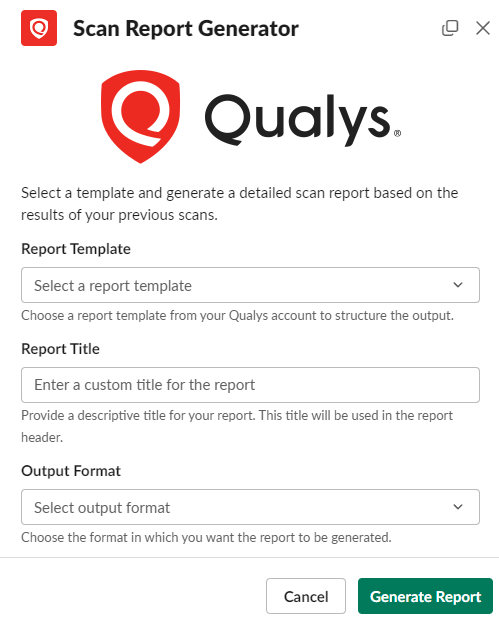"}, "typeVersion": 1}, {"id": "49b8ce63-cefd-483a-b802-03e3500d807b", "name": "Sticky Note4", "type": "n8n-nodes-base.stickyNote", "position": [1880, -200], "parameters": {"color": 5, "width": 535.8333316661616, "height": 658.907292269235, "content": ""}, "typeVersion": 1}, {"id": "3ec8c799-d5a5-4134-891a-59adb3e68e23", "name": "Sticky Note5", "type": "n8n-nodes-base.stickyNote", "position": [280, -158.042446016207], "parameters": {"color": 5, "width": 596.6847639718076, "height": 422.00743613240917, "content": "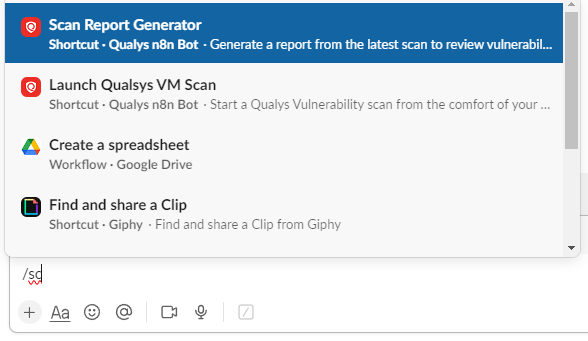\n### \ud83e\udd16 Triggering this workflow is as easy as typing a backslash in Slack"}, "typeVersion": 1}], "pinData": {}, "connections": {"Webhook": {"main": [[{"node": "Parse Webhook", "type": "main", "index": 0}]]}, "Parse Webhook": {"main": [[{"node": "Route Message", "type": "main", "index": 0}]]}, "Route Message": {"main": [[{"node": "Respond to Slack Webhook - Vulnerability", "type": "main", "index": 0}], [{"node": "Respond to Slack Webhook - Report", "type": "main", "index": 0}], [{"node": "Close Modal Popup", "type": "main", "index": 0}]]}, "Route Submission": {"main": [[{"node": "Required Scan Variables", "type": "main", "index": 0}], [{"node": "Required Report Variables", "type": "main", "index": 0}]]}, "Close Modal Popup": {"main": [[{"node": "Route Submission", "type": "main", "index": 0}]]}, "Required Scan Variables": {"main": [[{"node": "Qualys Start Vulnerability Scan", "type": "main", "index": 0}]]}, "Required Report Variables": {"main": [[{"node": "Qualys Create Report", "type": "main", "index": 0}]]}, "Respond to Slack Webhook - Report": {"main": [[{"node": "Scan Report Task Modal", "type": "main", "index": 0}]]}, "Respond to Slack Webhook - Vulnerability": {"main": [[{"node": "Vuln Scan Modal", "type": "main", "index": 0}]]}}}How to Import This Workflow
- 1Copy the workflow JSON above using the Copy Workflow JSON button.
- 2Open your n8n instance and go to Workflows.
- 3Click Import from JSON and paste the copied workflow.
Don't have an n8n instance? Start your free trial at n8nautomation.cloud
Related Templates
Auto-create TikTok videos with VEED.io AI avatars, ElevenLabs & GPT-4
Automate the creation and distribution of trending TikTok videos using AI avatars. This workflow connects Telegram, Perplexity, OpenAI, ElevenLabs, VEED.io, and BLOTATO to generate scripts, synthesize voice, create video, and publish across multiple social platforms. Content creators and marketers can rapidly produce engaging short-form video content without manual editing.
CV Screening with OpenAI
Streamline your hiring process by automating the initial screening of CVs with this powerful workflow. It connects directly to OpenAI to analyze resumes, extracting key information and evaluating candidates based on your criteria. This workflow is ideal for recruiters, HR professionals, and hiring managers who need to quickly assess a large volume of applications, saving significant time and effort in the early stages of recruitment. By automating the parsing of PDF documents and leveraging OpenAI's analytical capabilities, you can efficiently identify top candidates, reduce manual review time, and focus on more strategic aspects of the hiring process. This solution drastically cuts down on the hours spent manually reading CVs, allowing for faster shortlisting and improving overall recruitment efficiency.
Create daily historical AI videos with Gemini, fal.ai, Telegram and YouTube
Automate the creation and publishing of daily historical AI videos. This workflow connects Gemini for script generation, fal.ai for video creation, Telegram for approval, and YouTube for publishing. Content creators or educators can use this to consistently deliver engaging historical content without manual video production. It significantly reduces the time and effort involved in daily video creation and distribution.