Build Your Own Image Search Using AI Object Detection, CDN and ElasticSearchBuild Your Own Image Search Using AI Object Detection, CDN and ElasticSearch
Workflow JSON
{"meta": {"instanceId": "26ba763460b97c249b82942b23b6384876dfeb9327513332e743c5f6219c2b8e"}, "nodes": [{"id": "6359f725-1ede-4b05-bc19-05a7e85c0865", "name": "When clicking \"Test workflow\"", "type": "n8n-nodes-base.manualTrigger", "position": [680, 292], "parameters": {}, "typeVersion": 1}, {"id": "9e1e61c7-f5fd-4e8a-99a6-ccc5a24f5528", "name": "Fetch Source Image", "type": "n8n-nodes-base.httpRequest", "position": [1000, 292], "parameters": {"url": "={{ $json.source_image }}", "options": {}}, "typeVersion": 4.2}, {"id": "9b1b94cf-3a7d-4c43-ab6c-8df9824b5667", "name": "Split Out Results Only", "type": "n8n-nodes-base.splitOut", "position": [1428, 323], "parameters": {"options": {}, "fieldToSplitOut": "result"}, "typeVersion": 1}, {"id": "fcbaf6c3-2aee-4ea1-9c5e-2833dd7a9f50", "name": "Filter Score >= 0.9", "type": "n8n-nodes-base.filter", "position": [1608, 323], "parameters": {"options": {}, "conditions": {"options": {"leftValue": "", "caseSensitive": true, "typeValidation": "strict"}, "combinator": "and", "conditions": [{"id": "367d83ef-8ecf-41fe-858c-9bfd78b0ae9f", "operator": {"type": "number", "operation": "gte"}, "leftValue": "={{ $json.score }}", "rightValue": 0.9}]}}, "typeVersion": 2}, {"id": "954ce7b0-ef82-4203-8706-17cfa5e5e3ff", "name": "Crop Object From Image", "type": "n8n-nodes-base.editImage", "position": [2080, 432], "parameters": {"width": "={{ $json.box.xmax - $json.box.xmin }}", "height": "={{ $json.box.ymax - $json.box.ymin }}", "options": {"format": "jpeg", "fileName": "={{ $binary.data.fileName.split('.')[0].urlEncode()+'-'+$json.label.urlEncode() + '-' + $itemIndex }}.jpg"}, "operation": "crop", "positionX": "={{ $json.box.xmin }}", "positionY": "={{ $json.box.ymin }}"}, "typeVersion": 1}, {"id": "40027456-4bf9-4eea-8d71-aa28e69b29e5", "name": "Set Variables", "type": "n8n-nodes-base.set", "position": [840, 292], "parameters": {"options": {}, "assignments": {"assignments": [{"id": "9e95d951-8530-4a80-bd00-6bb55623a71f", "name": "CLOUDFLARE_ACCOUNT_ID", "type": "string", "value": ""}, {"id": "66807a90-63a1-4d4e-886e-e8abf3019a34", "name": "model", "type": "string", "value": "@cf/facebook/detr-resnet-50"}, {"id": "a13ccde6-e6e3-46f4-afa3-2134af7bc765", "name": "source_image", "type": "string", "value": "https://images.pexels.com/photos/2293367/pexels-photo-2293367.jpeg?auto=compress&cs=tinysrgb&w=600"}, {"id": "0734fc55-b414-47f7-8b3e-5c880243f3ed", "name": "elasticsearch_index", "type": "string", "value": "n8n-image-search"}]}}, "typeVersion": 3.3}, {"id": "c3d8c5e3-546e-472c-9e6e-091cf5cee3c3", "name": "Use Detr-Resnet-50 Object Classification", "type": "n8n-nodes-base.httpRequest", "position": [1248, 324], "parameters": {"url": "=https://api.cloudflare.com/client/v4/accounts/{{ $('Set Variables').item.json.CLOUDFLARE_ACCOUNT_ID }}/ai/run/{{ $('Set Variables').item.json.model }}", "method": "POST", "options": {}, "sendBody": true, "contentType": "binaryData", "authentication": "predefinedCredentialType", "inputDataFieldName": "data", "nodeCredentialType": "cloudflareApi"}, "credentials": {"cloudflareApi": {"id": "", "name": "[Your cloudflareApi]"}}, "typeVersion": 4.2}, {"id": "3c7aa2fc-9ca1-41ba-a10d-aa5930d45f18", "name": "Upload to Cloudinary", "type": "n8n-nodes-base.httpRequest", "position": [2380, 380], "parameters": {"url": "https://api.cloudinary.com/v1_1/daglih2g8/image/upload", "method": "POST", "options": {}, "sendBody": true, "sendQuery": true, "contentType": "multipart-form-data", "authentication": "genericCredentialType", "bodyParameters": {"parameters": [{"name": "file", "parameterType": "formBinaryData", "inputDataFieldName": "data"}]}, "genericAuthType": "httpQueryAuth", "queryParameters": {"parameters": [{"name": "upload_preset", "value": "n8n-workflows-preset"}]}}, "credentials": {"httpQueryAuth": {"id": "", "name": "[Your httpQueryAuth]"}}, "typeVersion": 4.2}, {"id": "3c4e1f04-a0ba-4cce-b82a-aa3eadc4e7e1", "name": "Create Docs In Elasticsearch", "type": "n8n-nodes-base.elasticsearch", "position": [2580, 380], "parameters": {"indexId": "={{ $('Set Variables').item.json.elasticsearch_index }}", "options": {}, "fieldsUi": {"fieldValues": [{"fieldId": "image_url", "fieldValue": "={{ $json.secure_url.replace('upload','upload/f_auto,q_auto') }}"}, {"fieldId": "source_image_url", "fieldValue": "={{ $('Set Variables').item.json.source_image }}"}, {"fieldId": "label", "fieldValue": "={{ $('Crop Object From Image').item.json.label }}"}, {"fieldId": "metadata", "fieldValue": "={{ JSON.stringify(Object.assign($('Crop Object From Image').item.json, { filename: $json.original_filename })) }}"}]}, "operation": "create", "additionalFields": {}}, "credentials": {"elasticsearchApi": {"id": "", "name": "[Your elasticsearchApi]"}}, "typeVersion": 1}, {"id": "292c9821-c123-44fa-9ba1-c37bf84079bc", "name": "Sticky Note", "type": "n8n-nodes-base.stickyNote", "position": [620, 120], "parameters": {"color": 7, "width": 541.1455500767354, "height": 381.6388867600897, "content": "## 1. Get Source Image\n[Read more about setting variables for your workflow](https://docs.n8n.io/integrations/builtin/core-nodes/n8n-nodes-base.set)\n\nFor this demo, we'll manually define an image to process. In production however, this image can come from a variety of sources such as drives, webhooks and more."}, "typeVersion": 1}, {"id": "863271dc-fb9d-4211-972d-6b57336073b4", "name": "Sticky Note1", "type": "n8n-nodes-base.stickyNote", "position": [1180, 80], "parameters": {"color": 7, "width": 579.7748008857744, "height": 437.4680103498263, "content": "## 2. Use Detr-Resnet-50 Object Classification\n[Learn more about Cloudflare Workers AI](https://developers.cloudflare.com/workers-ai/)\n\nNot all AI workflows need an LLM! As in this example, we're using a non-LLM vision model to parse the source image and return what objects are contained within. The image search feature we're building will be based on the objects in the image making for a much more granular search via object association.\n\nWe'll use the Cloudflare Workers AI service which conveniently provides this model via API use."}, "typeVersion": 1}, {"id": "b73b45da-0436-4099-b538-c6b3b84822f2", "name": "Sticky Note2", "type": "n8n-nodes-base.stickyNote", "position": [1800, 260], "parameters": {"color": 7, "width": 466.35460775498495, "height": 371.9272151757119, "content": "## 3. Crop Objects Out of Source Image\n[Read more about Editing Images in n8n](https://docs.n8n.io/integrations/builtin/core-nodes/n8n-nodes-base.editimage)\n\nWith our objects identified by their bounding boxes, we can \"cut\" them out of the source image as separate images."}, "typeVersion": 1}, {"id": "465bd842-8a35-49d8-a9ff-c30d164620db", "name": "Sticky Note3", "type": "n8n-nodes-base.stickyNote", "position": [2300, 180], "parameters": {"color": 7, "width": 478.20345439832454, "height": 386.06196032653685, "content": "## 4. Index Object Images In ElasticSearch\n[Read more about using ElasticSearch](https://docs.n8n.io/integrations/builtin/app-nodes/n8n-nodes-base.elasticsearch)\n\nBy storing the newly created object images externally and indexing them in Elasticsearch, we now have a foundation for our Image Search service which queries by object association."}, "typeVersion": 1}, {"id": "6a04b4b5-7830-410d-9b5b-79acb0b1c78b", "name": "Sticky Note4", "type": "n8n-nodes-base.stickyNote", "position": [1800, -220], "parameters": {"color": 7, "width": 328.419768654291, "height": 462.65463700396174, "content": "Fig 1. Result of Classification\n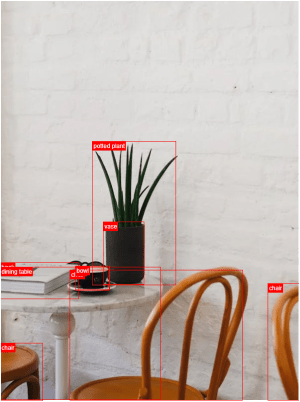"}, "typeVersion": 1}, {"id": "8f607951-ba41-4362-8323-e8b4b96ad122", "name": "Fetch Source Image Again", "type": "n8n-nodes-base.httpRequest", "position": [1880, 432], "parameters": {"url": "={{ $('Set Variables').item.json.source_image }}", "options": {}}, "typeVersion": 4.2}, {"id": "6933f67d-276b-4908-8602-654aa352a68b", "name": "Sticky Note8", "type": "n8n-nodes-base.stickyNote", "position": [220, 120], "parameters": {"width": 359.6648027457353, "height": 352.41026669883723, "content": "## Try It Out!\n### This workflow does the following:\n* Downloads an image\n* Uses an object classification AI model to identify objects in the image.\n* Crops the objects out from the original image into new image files.\n* Indexes the image's object in an Elasticsearch Database to enable image search.\n\n### Need Help?\nJoin the [Discord](https://discord.com/invite/XPKeKXeB7d) or ask in the [Forum](https://community.n8n.io/)!\n\nHappy Hacking!"}, "typeVersion": 1}, {"id": "35615ed5-43e8-43f0-95fe-1f95a1177d69", "name": "Sticky Note5", "type": "n8n-nodes-base.stickyNote", "position": [800, 280], "parameters": {"width": 172.9365918827757, "height": 291.6881468483679, "content": "\n\n\n\n\n\n\n\n\n\n\n\n\n\n\n\n\ud83d\udea8**Required**\n* Set your variables here first!"}, "typeVersion": 1}], "pinData": {}, "connections": {"Set Variables": {"main": [[{"node": "Fetch Source Image", "type": "main", "index": 0}]]}, "Fetch Source Image": {"main": [[{"node": "Use Detr-Resnet-50 Object Classification", "type": "main", "index": 0}]]}, "Filter Score >= 0.9": {"main": [[{"node": "Fetch Source Image Again", "type": "main", "index": 0}]]}, "Upload to Cloudinary": {"main": [[{"node": "Create Docs In Elasticsearch", "type": "main", "index": 0}]]}, "Crop Object From Image": {"main": [[{"node": "Upload to Cloudinary", "type": "main", "index": 0}]]}, "Split Out Results Only": {"main": [[{"node": "Filter Score >= 0.9", "type": "main", "index": 0}]]}, "Fetch Source Image Again": {"main": [[{"node": "Crop Object From Image", "type": "main", "index": 0}]]}, "When clicking \"Test workflow\"": {"main": [[{"node": "Set Variables", "type": "main", "index": 0}]]}, "Use Detr-Resnet-50 Object Classification": {"main": [[{"node": "Split Out Results Only", "type": "main", "index": 0}]]}}}How to Import This Workflow
- 1Copy the workflow JSON above using the Copy Workflow JSON button.
- 2Open your n8n instance and go to Workflows.
- 3Click Import from JSON and paste the copied workflow.
Don't have an n8n instance? Start your free trial at n8nautomation.cloud
Related Templates
Text to Speech (OpenAI)
Converts text into natural-sounding speech using OpenAI's Text-to-Speech API. It sends your input text to OpenAI and receives an audio file in return. This is useful for creating audio versions of articles, generating voiceovers for videos, or providing accessibility features for web content. Quickly transform written content into engaging audio.
Automate Customer Support Issue Resolution using AI Text Classifier
Automate the resolution of customer support issues by classifying their state and applying AI-driven actions. This workflow connects Jira for issue management, OpenAI for AI classification and response generation, and Slack for notifications. Support teams can use this to automatically close resolved tickets, remind customers about open issues, or escalate complex cases.
AI-Powered Candidate Shortlisting Automation for ERPNext
Automate AI-powered candidate shortlisting for ERPNext job applications. This workflow connects ERPNext, Google Gemini, WhatsApp, and Outlook to process resumes, evaluate candidates, and communicate outcomes. Recruiters and HR departments can use this to efficiently screen applicants, automatically reject unqualified candidates, and send acceptance notifications. It significantly reduces manual review time and streamlines the hiring process.